
Is the cluster full, or is it my pod? Know in one tab.
Free room counted the way the scheduler counts it, every pending pod with the scheduler's own reason and the autoscaler's answer, how many more pods of each workload fit right now, and how many days until each node pool is full.
one helm install · get, list, watch only · first findings in minutes
Overview
A pending pod looks the same whether the cluster is out of room, a pool has hit its ceiling, or the pod asks for something no node offers. Runtimez counts room from requests over the nodes that can actually take a pod, reads the autoscaler's own state, and quotes the scheduler verbatim — so each shortage reads as what it is, with the fix that matches.
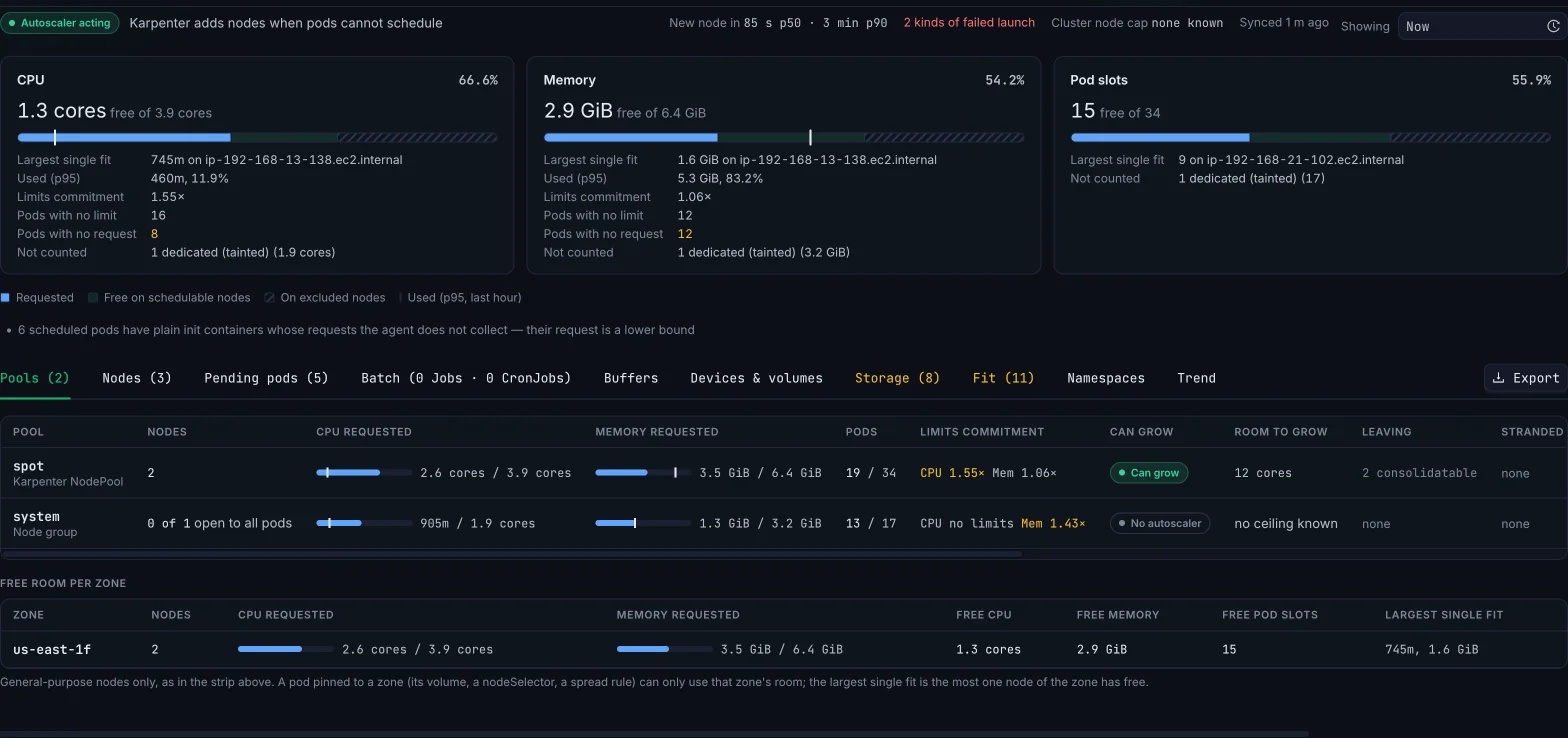
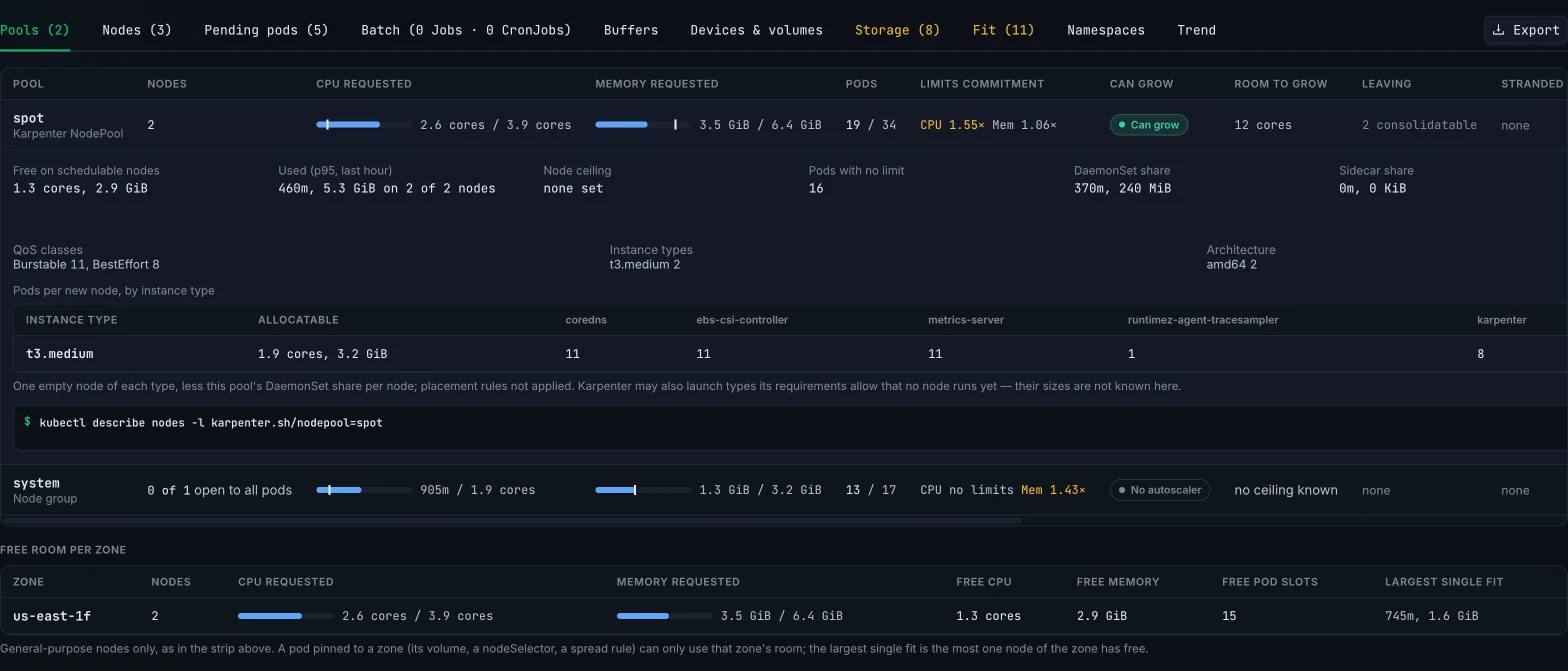
Which pool has room, and how far each one can grow
Free room per Karpenter NodePool and node group, over the nodes that take general pods, with the autoscaler's own verdict on whether the pool can still add nodes.
- Can grow, At ceiling, Backoff or Autoscaler down, with room to grow from NodePool limits, node-group max size and the cluster-wide cap.
- Stranded room: free CPU that no workload can use because the memory on that node is already gone.
- Nodes the autoscaler cannot remove, and what holds each one — a PodDisruptionBudget at zero,
do-not-disrupt, a group at its minimum.
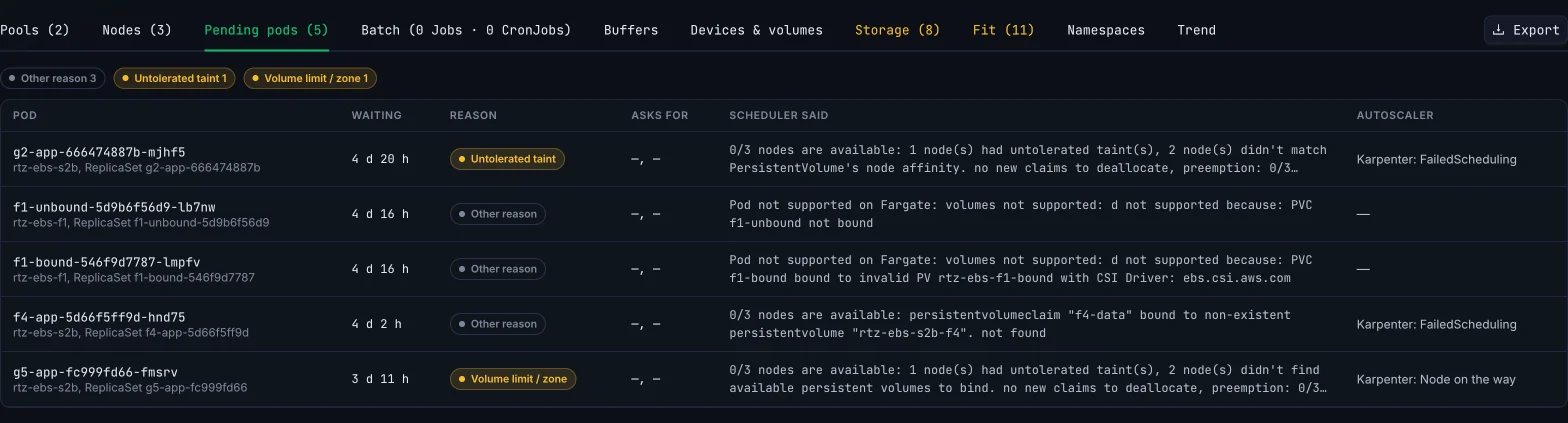
Every pending pod, in the scheduler's own words
The scheduler's message verbatim, the reason in plain words, and what the autoscaler said about the same pod.
- A real shortage reads differently from an untolerated taint, a topology-spread rule, a volume pinned to another zone or a quota refusal.
- Karpenter nominations and Cluster Autoscaler scale-ups shown per pod, so you know whether help is already on its way.
- Pods held by a scheduling gate are listed apart — they wait on purpose and never count as a shortage.
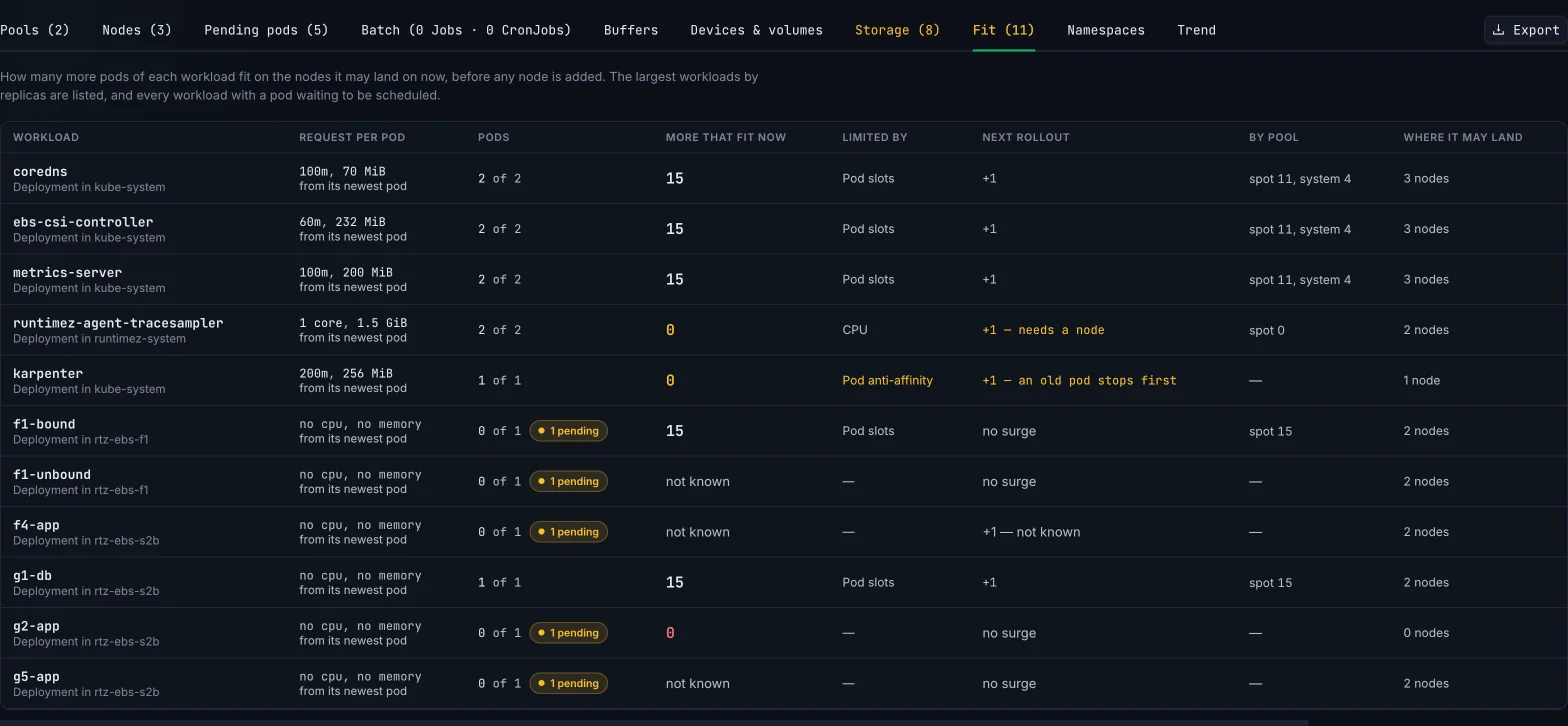
How many more pods of each workload fit — right now
Per workload, from its newest pod's real request, over only the nodes it may land on.
- Honours node selectors, affinity, tolerations, topology spread, anti-affinity and the zone a volume pins a pod to.
- Whether the next rollout's surge fits beside the old pods, and whether every HPA at its max still fits.
- If a zone goes down: the pods that must move, whether the other zones take them, and which ones a zonal volume keeps down.
Days until each pool is full
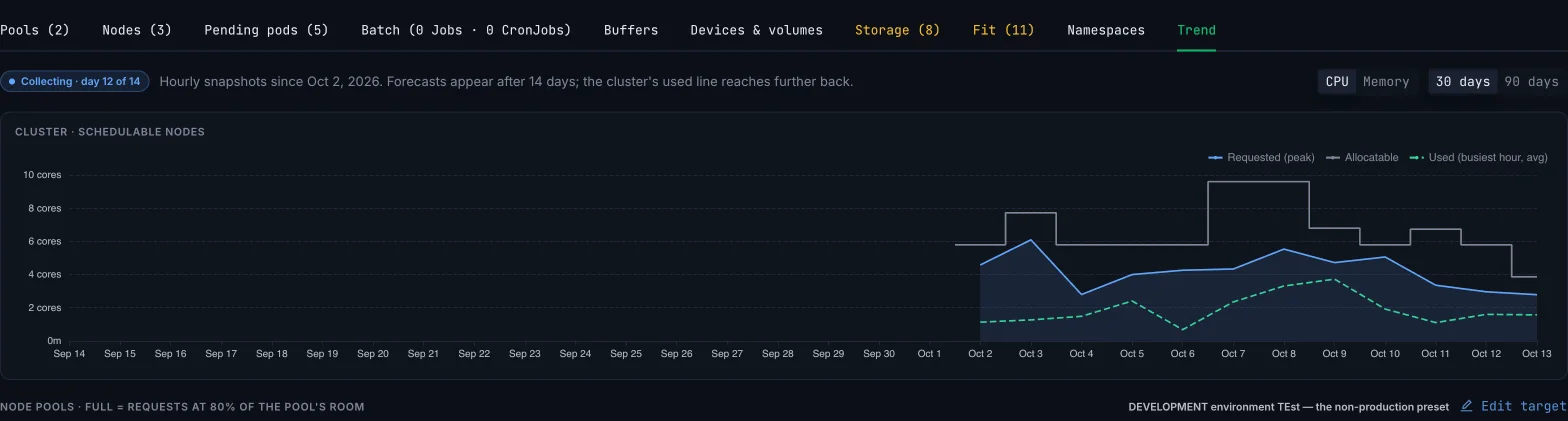
Daily peaks of requests per pool beside allocatable, use and the autoscaler's ceiling, over 30 or 90 days.
- A forecast per pool against a headroom target you set — per cluster or per pool.
- One-day jumps are marked as steps, with the workload changes recorded around them.
- Until there are 14 complete days of history a pool reads collecting — it never draws a line through too little data.
Ask what happens before you change it
Ask Runtimez and the MCP server simulate a change against the current cluster and answer pod by pod.
- Scale a workload, change its request, add a workload, add or remove nodes, drain every node in turn, lose a zone, or change a pool's limit.
- Each answer says which pods run, which wait, and which pool grows to take them — from the same numbers as the tab.
- Read-only: nothing is applied to the cluster.
> if we deploy 3 more pods at 1 CPU each in the spot pool, do they fit?

● runtimez_capacity_summary  section="what_if" changes=[addWorkload 3 × 1 cpu, pool=spot]
  └ fits with new nodes · 0 fit on today's nodes · spot grows by 3 · syncId 4772d1…

Not on today's nodes: each spot node has under 1 CPU free.
Karpenter can add 3 spot nodes (one pod each) before the
pool's cpu limit is reached, so all 3 pods run after scale-up.
Lower that limit to 8 CPU and only 2 nodes fit — one pod waits.
More in Capacity Planning
Everything else that ships in this product today.
Storage
How full each persistent volume is and when it fills, claims that will not bind and why, and each node's root disk against the kubelet's eviction point.
GPUs and devices
Accelerators, MIG profiles, device plugins and DRA devices free per pool, idle accelerators, and volume attach slots per node.
Batch
Jobs waiting for room, and CronJobs whose runs overlap — in plain words: a run every minute that takes 2½ minutes means 3 at once.
Buffers
CapacityBuffers, placeholder pods and ProvisioningRequests: the spare room you keep on purpose, and whether it is still there.
Namespaces
Requests per namespace against use, ResourceQuotas as kubectl describe quota prints them, and the LimitRange defaults that filled in requests no YAML shows.
Fleet and history
Every cluster's capacity in one Home panel, any past hour's pool totals, and CSV or JSON export of every table.
How it compares
They sum requests per node. Runtimez leaves out the nodes a pod cannot use, reads the autoscaler, and tells you how many more pods of each workload fit.
They tell you what the cluster costs. Runtimez tells you whether the next pod, rollout or zone outage fits — and when each pool runs out.
Does Runtimez change my cluster or my autoscaler?
No. The agent is read-only. Capacity is computed from what it syncs, and what-if questions are simulated, never applied.
Why does free room differ from what my monitoring shows?
Monitoring shows use. The scheduler places pods by request, and only on nodes the pod may land on. Runtimez counts room the way the scheduler does, and shows p95 use beside it.
Which autoscalers does it read?
Karpenter (NodePools, NodeClaims, limits and disruption settings), Cluster Autoscaler (node groups, status and scale-down candidates) and EKS Auto Mode.
When does the days-to-full forecast appear?
After 14 complete days of history, which starts when the cluster is connected. Until then each pool says how many days it has collected.
Related reading
One agent, the rest of the platform
Every product runs off the same read-only sweep and feeds the same ranked queue.
See it on your own cluster in under an hour.
Free for your first cluster. Read-only by default. Uninstall is one helm command.